
Essay · 14 min read
First-class CopilotKit: how B4.run fills the chat slots
Learn how B4.run fills CopilotKit v2's chat slots so every agent turn renders as one readable block, in React and in Angular.

Learn how B4.run fills CopilotKit v2's chat slots so every agent turn renders as one readable block, in React and in Angular.
B4.run is a server framework. It doesn't care what draws the chat, as long as the chat speaks AG-UI, and every B4.run route serves AG-UI out of the box. If your app already uses CopilotKit, you should get B4.run's whole picture of a turn without throwing away the chat you have. That's what this post is about.
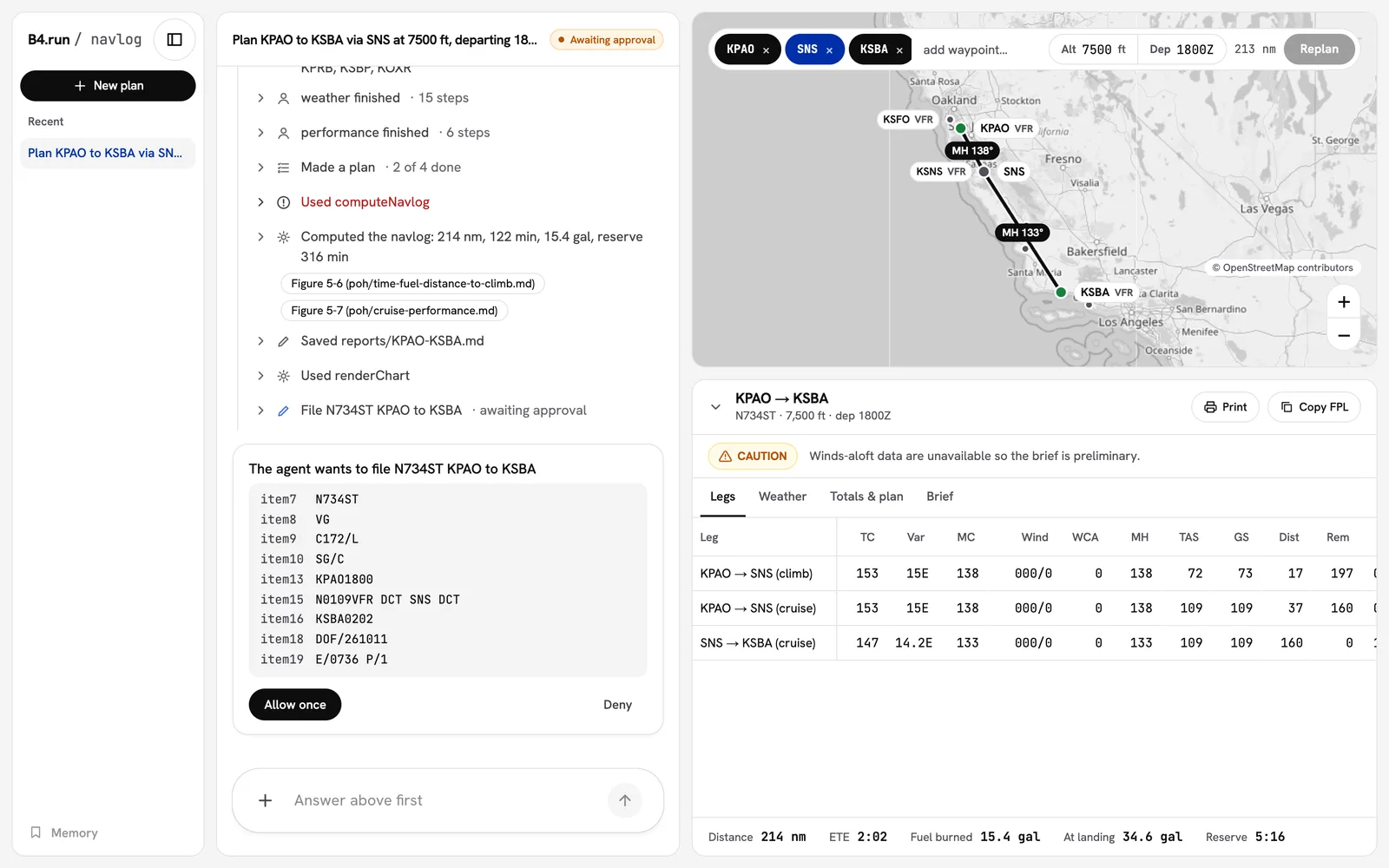
But here's the thing. An agent turn isn't a chat message. One question to navlog, our flight planner, can look up weather at four airports, read a performance table, run two subagents, think for forty seconds, and then stop to ask permission before it files a flight plan. A chat that renders each of those as its own row isn't showing you what the agent did. It's showing you a log.
So in B4.run 0.14 we stopped rendering beside CopilotKit and started rendering inside it. B4.run's activity components plug straight into the slots on CopilotKit's own <CopilotChat>. You keep CopilotKit's chat. The agent's turn reads like a person wrote it.
GoalsCopy link to section: Goals
This post is for TypeScript developers who use CopilotKit, or are thinking about it, with an agent backend. We'll:
- See what a stock
<CopilotChat>does with a busy agent turn. - Learn what a CopilotKit slot is.
- Wire B4.run's slots into a chat with two lines of code.
- Walk through what fills each slot, and why.
- Compose our own slots on top, the way navlog does.
- Do the same thing in Angular.
- Look at how this compares to the other agent frameworks.
- Look ahead to threadplane, where we own both ends.
The ProblemCopy link to section: The Problem
Before we built any of this, we ran a spike. We pointed a stock CopilotKit 1.76 <CopilotChat> at our research example and asked it a question. The agent made 19 tool calls. The chat drew 19 assistant rows for them, one call per row, for a single answer.
A few other things showed up:
- Each subagent's answer rendered as a top-level assistant message, as if the main agent had said it.
- Every one of those rows was a full assistant message, toolbar and all, even with no text in it.
- Reasoning renders on its own row, so once we added a turn summary that shows the reasoning, a turn would read "Thought for 40 seconds" twice.
- When the agent parked on an approval, the stock chat showed no approval UI at all. The run just ended.
None of this is a CopilotKit bug. CopilotKit renders the messages it's given, and it has no idea what a B4.run turn is. That's our job.
What Is a Slot?Copy link to section: What Is a Slot?
Every region of a CopilotKit v2 chat component is a slot. That includes CopilotChat, CopilotSidebar and CopilotPopup. According to the CopilotKit docs, a slot takes one of three things:
- A class string, merged with the default classes.
- An object of props, which override the default component's props.
- A component of your own, which receives the default's props.
Slots nest. messageView is a slot on the chat, assistantMessage is a slot on messageView, and toolCallsView is a slot on assistantMessage. messageView also takes a transformMessages function, which reshapes the message list before any row renders.
This is the right seam for an agent framework. We don't fork CopilotKit's chat, wrap it, or ask you to build your own. We hand CopilotKit the parts it asks for.
Two Lines of CodeCopy link to section: Two Lines of Code
Here's a CopilotKit chat with B4.run's activity:
import "@b4run/ag-ui/styles.css"
import { B4Activity, useB4ChatSlots } from "@b4run/ag-ui/react/copilotkit"
import { CopilotChat, CopilotKit } from "@copilotkit/react-core/v2"

function Chat() {
  return <CopilotChat {...useB4ChatSlots()} />
}

export default function Page() {
  return (
    <CopilotKit runtimeUrl="/api/copilotkit" useSingleEndpoint={false}>
      <B4Activity>
        <Chat />
      </B4Activity>
    </CopilotKit>
  )
}
A few things to note:
B4Activityis a provider. It follows the CopilotKit agent, folds its AG-UI events into turns, and owns the approval cards.useB4ChatSlots()returns the props you spread onto<CopilotChat>. That's the whole integration.CopilotSidebarandCopilotPopuptake the samemessageViewslot, so the same hook skins them unchanged. Our chat example uses the sidebar.- It requires
@copilotkit/react-core1.76 or later, the AG-UI 1.0 line.
That's it. Super easy.
What Fills Each SlotCopy link to section: What Fills Each Slot
Let's break down what useB4ChatSlots() and B4Activity actually hand CopilotKit.
transformMessages: One Row per TurnCopy link to section: transformMessages: One Row per Turn
The spike taught us that you can't just merge adjacent tool rows. The message list CopilotKit receives interleaves tool results between the calls: assistant, tool, assistant, tool. Two tool-only messages are never next to each other.
So we merge by turn instead. mergeTurnMessages is the transformMessages function. A turn is the run of messages after each user message. Here is what it does:
- First, it picks the turn's first assistant message that carries tool calls. That message becomes the turn's activity row.
- Next, it moves every later tool call in the turn onto that row, in order.
- Then, a later message with text keeps its text and loses its calls. A later tool-only message is dropped.
- Finally, subagent messages are dropped from the top level. Their text lives inside the subagent's nested turn, where it belongs.
Tool results stay in the list, so CopilotKit's tool-call lookups still work. And when nothing changes, it returns the same array, so CopilotKit's memoization holds.
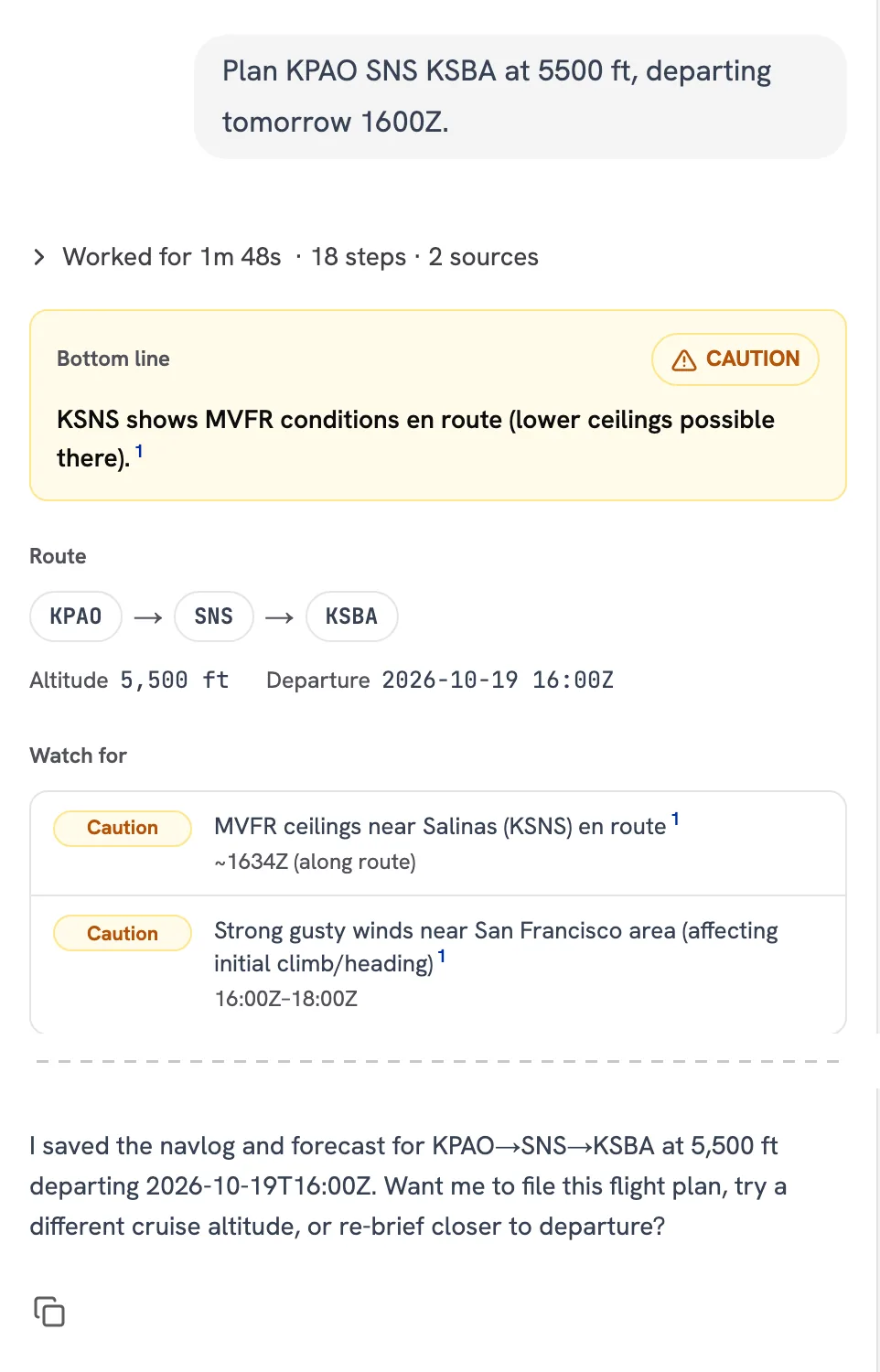
Here's what that looks like in navlog. This turn made 18 tool calls. With mergeTurnMessages(), they fold into one "Worked for 1m 48s" line, and the answer follows it:
assistantMessage: The Turn's ActivityCopy link to section: assistantMessage: The Turn's Activity
The assistant message slot wraps CopilotKit's own CopilotChatAssistantMessage. We don't replace it. Here's the shape of it:
const B4AssistantMessage = Object.assign(function B4AssistantMessage(
  props: CopilotChatAssistantMessageProps,
) {
  return (
    <CopilotChatAssistantMessage
      {...props}
      toolbarVisible={hasText(props.message.content)}
      toolCallsView={B4ToolCallsView}
    />
  )
}, CopilotChatAssistantMessage)
Let's review:
- CopilotKit still renders the markdown, the toolbar and everything else it renders today.
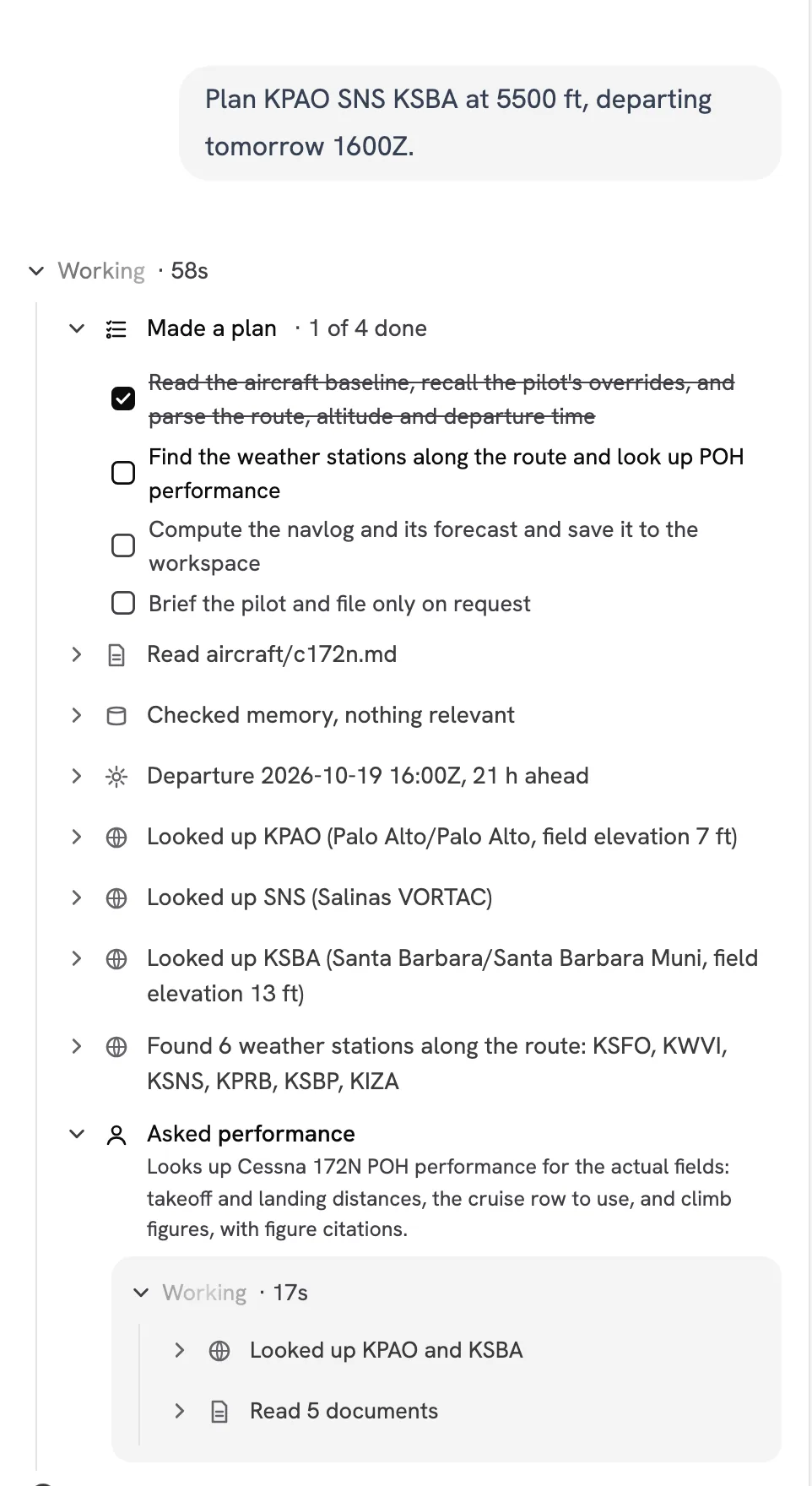
toolbarVisibleis on only when the message has text. No more Copy button under a row with nothing to copy.toolCallsViewis the slot inside the slot.B4ToolCallsViewfinds the turn that owns the message's tool calls and renders oneTurnActivityfor it: a summary line, the plain-language steps, the plan, the reasoning, and each subagent with its own steps nested inside.
Here's the same turn while it ran. The plan checks itself off, each tool call reads as a plain-language step, and the performance subagent runs with its own steps nested inside:
Click the summary line after a turn finishes and the whole turn opens back up. The subagent collapses to "Asked performance · 8 steps", and the step that computed the navlog cites the POH figures it used:
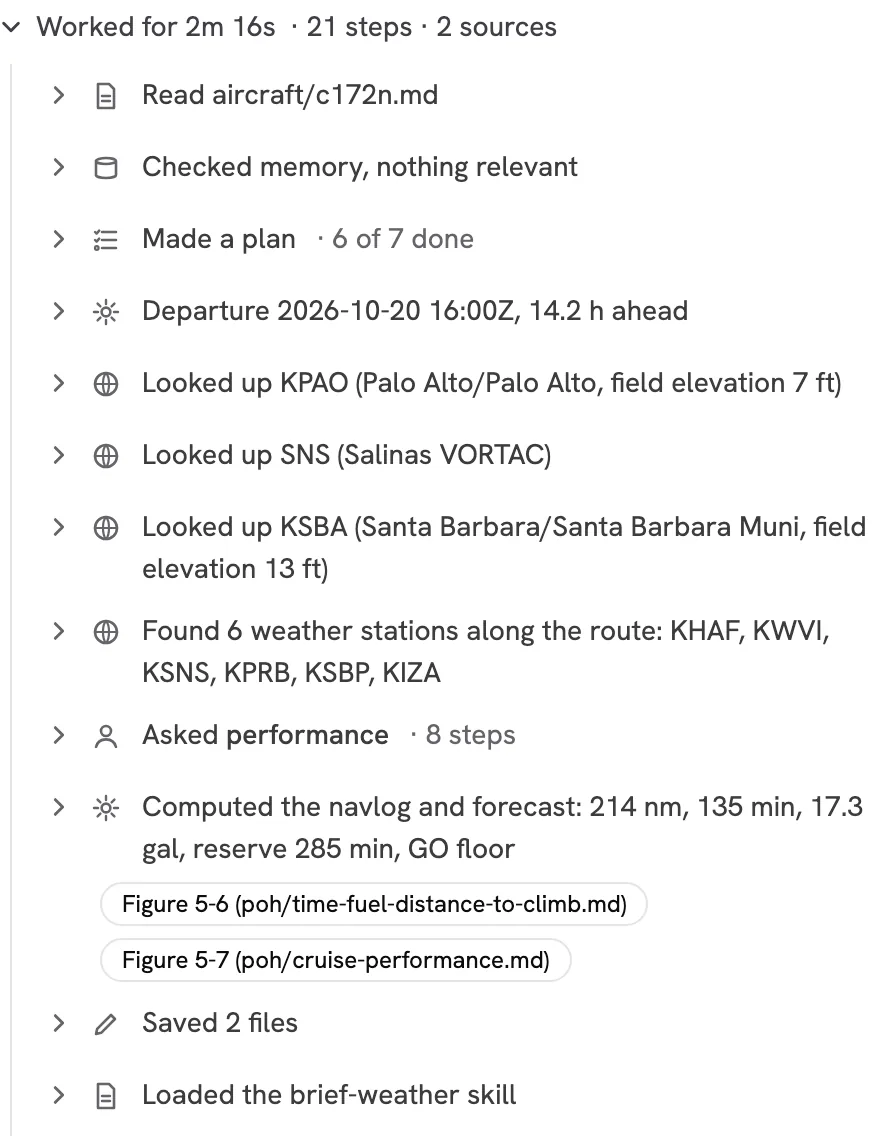
Notice the toolbar, too. In the first screenshot there's exactly one Copy button, and it's under the answer.
What's with the Object.assign()? This took me awhile to figure out, so I hope it saves you some time. The assistantMessage slot is typed as SlotValue<typeof CopilotChatAssistantMessage>. The typeof includes the component's namespace statics, like MarkdownRenderer, Toolbar and CopyButton. A plain function component doesn't have them, so TypeScript rejects it:
Type '(props: CopilotChatAssistantMessageProps) => Element' is not assignable to type
'SlotValue<typeof CopilotChatAssistantMessage> | undefined'.
  Type '(props: CopilotChatAssistantMessageProps) => Element' is missing the following
  properties from type 'typeof CopilotChatAssistantMessage': MarkdownRenderer, Toolbar,
  ToolbarButton, CopyButton, and 5 more.
Object.assign() copies the statics onto our wrapper. It typechecks with no cast, and anyone who reaches for B4AssistantMessage.MarkdownRenderer still gets CopilotKit's.
reasoningMessage: Say It OnceCopy link to section: reasoningMessage: Say It Once
CopilotKit renders each reasoning message on its own row. TurnActivity shows the same reasoning as a step inside the turn. So for a turn with an activity row, our reasoning slot renders nothing. For a turn that only thought and answered, there's no activity row, so the reasoning stays CopilotKit's.
B4Activity: Tool Rows and ApprovalsCopy link to section: B4Activity: Tool Rows and Approvals
Two more pieces live in the provider, not the slots:
- It registers a wildcard
useRenderTool({ name: "*" })that rendersnull. That hides CopilotKit's generic per-tool rows, since the turn already shows every step. - It owns CopilotKit's
useInterrupt(). Each parked approval renders as anApprovalCardin the chat, titled from the tool's own label, so it reads "The agent wants to file N734ST KPAO to KSBA" instead of "wants to use fileFlightPlan". Allowing resolves the interrupt and Deny cancels it, both through CopilotKit.
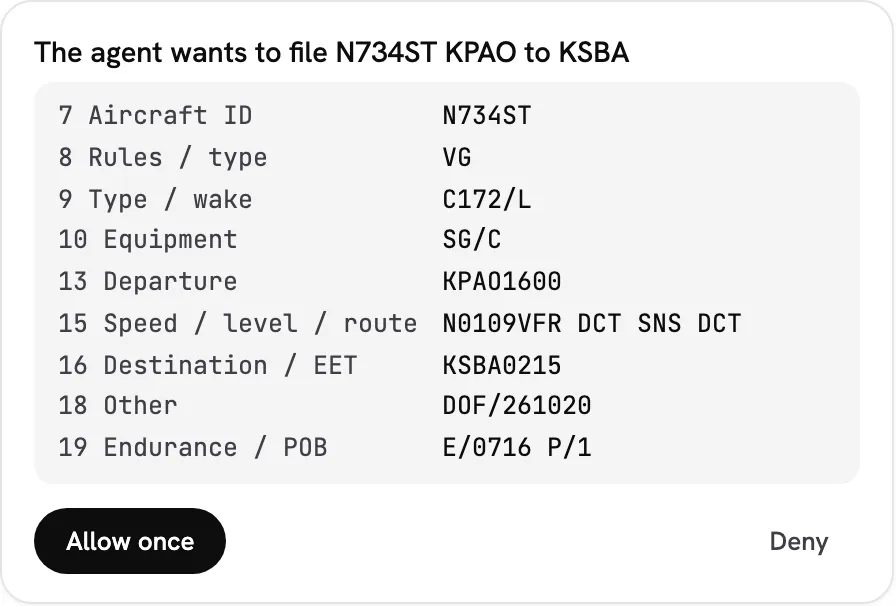
Filing a flight plan is never a standing approval in navlog, so the card offers only Allow once and Deny.
The rows read "7 Aircraft ID" rather than item7 because navlog names the tool's argument keys. That's a fields entry in the same labels prop that rewords steps:
<B4Activity
  labels={{
    fileFlightPlan: { fields: { item7: "7 Aircraft ID", item13: "13 Departure" /* … */ } },
  }}
>
The step's detail panel uses the same names, so a pilot reads the same words before and after approving.
CopilotKit has one interrupt slot, so don't register another useInterrupt() with renderInChat in the same app. For the same reason, don't also call useDefaultRenderTool(). Wildcard renderers are last-wins.
Bring Your Own SlotsCopy link to section: Bring Your Own Slots
The slots are plain objects, so you can keep ours and swap any one of them. navlog renders its go/no-go brief through its own assistant message and strips a few echo messages before ours merge the turn:
const slots = useB4ChatSlots()
const merge = slots.messageView.transformMessages
// CopilotChat memoizes the message list on this function: keep it stable.
const transformMessages = useCallback((m: Message[]) => stripEchoMessages(merge(m)), [merge])
const messageView = useMemo(
  () => ({ ...slots.messageView, assistantMessage: NavlogAssistantMessage, transformMessages }),
  [slots.messageView, transformMessages],
)

return <CopilotChat messageView={messageView} />
A few things to note:
- We spread
slots.messageView, so the reasoning slot is still B4.run's. transformMessagescomposes. navlog's filter runs on the merged list.- Wrap it in
useCallback(). CopilotKit's docs say to pass a stable function, or it reruns on every render. NavlogAssistantMessagestill rendersTurnActivity. navlog passes our assistant slot down through a React context rather than callinguseB4ChatSlots()in every message, so a message doesn't re-render every time the activity updates.
The turns aren't stuck in the chat, either. useB4ActivityContext() returns the same turns to any component under B4Activity. navlog draws its route map and its navlog sheet from them.
Angular, TooCopy link to section: Angular, Too
CopilotKit has an official Angular package, @copilotkit/angular, and B4.run ships the same activity kit for it at @b4run/ag-ui/angular/copilotkit. Here's the chat:
import { Component, inject } from "@angular/core"
import { CopilotChat } from "@copilotkit/angular"
import {
  B4ActivityApprovalsComponent,
  B4ActivityAssistantMessageComponent,
  B4ActivityReasoningMessageComponent,
  B4ActivityStore,
  provideB4Activity,
} from "@b4run/ag-ui/angular/copilotkit"

@Component({
  selector: "app-chat",
  imports: [CopilotChat],
  providers: [provideB4Activity({ agentId: "default" })],
  template: `<copilot-chat agentId="default"
    [assistantMessageComponent]="assistant"
    [reasoningMessageComponent]="reasoning"
    [messageViewChildrenComponent]="approvals" />`,
})
export class ChatComponent {
  readonly activity = inject(B4ActivityStore)
  readonly assistant = B4ActivityAssistantMessageComponent
  readonly reasoning = B4ActivityReasoningMessageComponent
  readonly approvals = B4ActivityApprovalsComponent
}
The important things to understand are:
provideB4Activity()is the AngularB4Activity. The store holds the turns as signals.B4ActivityAssistantMessageComponentrenders the text through CopilotKit's own<copilot-chat-assistant-message>, then one<b4-turn-activity>on the turn's first assistant message.- CopilotKit's Angular chat has no
transformMessagesyet, so the merge happens at render time instead. The component asksturnForMessage()whether it's the turn's first message. A tool-only message renders nothing, and so does a subagent's. B4ActivityReasoningMessageComponentis the Angular reasoning slot. Like React's, it renders nothing when the turn's activity already shows that reasoning.- Both kits render the same DOM and share one stylesheet. The rules live in
@b4run/ag-ui/view, which has no framework dependency, so React and Angular can't drift apart on what a turn is.
I've been writing Angular for a long time, so this one makes me especially happy. 😆
Both Ends of the WireCopy link to section: Both Ends of the Wire
The slots are the part you see. They only work because B4.run owns the other end too:
- Every route serves AG-UI 1.0 at
POST /agui/:routeId, andGETon the same path answers with what the route supports. B4HttpAgentis the agent you register in CopilotKit's runtime route.createB4AgentRunner()wraps CopilotKit's ownInMemoryAgentRunner, so a reload, a restart or a different instance restores the chat, every turn's activity, and any parked approval from B4.run's storage.forwardIdentity()sets the caller's identity headers on the server, so a browser can't claim to be someone else.
The 0.14 release post walks through the server half in detail. See Survive a reload.
How Does This Compare?Copy link to section: How Does This Compare?
I wanted to know if we were the first agent framework to do this. So we went looking. Here's what we found, as of October 18, 2026.
The AG-UI README lists over a dozen frameworks with AG-UI support: LangGraph, CrewAI, Mastra, Microsoft Agent Framework, Google ADK, AWS Strands, Pydantic AI, Agno, LlamaIndex, AG2 and more. Every one of them we checked integrates on the backend. They emit AG-UI events, and CopilotKit's default chat renders them. Several of those adapters are maintained by the CopilotKit team, not the framework team. That's a good thing for the ecosystem. But none of them ships a frontend that plugs into CopilotKit's chat slots.
| Backend (AG-UI) | React slot components | Angular CopilotKit components | |
|---|---|---|---|
| LangGraph, Mastra, CrewAI, Microsoft, Google ADK, AWS Strands, Pydantic AI, LlamaIndex, Agno, AG2 | ✓ | ||
| kaboo | ✓ | ✓ | |
| B4.run | ✓ | ✓ | ✓ |
So, are we first? No. Credit where it's due: kaboo, a small framework built on Strands, shipped a drop-in messageView for CopilotKit v2 in July 2026, about three months before we did. Nice work.
What I can say is this: to our knowledge, B4.run is the only agent framework that ships CopilotKit slot components for both React and Angular, backed by one framework-free view model, with restore and identity on the server side. If you know of another one, let me know. I'd love to see it.
What's Next: threadplaneCopy link to section: What's Next: threadplane
Slots are a good seam. But a seam is still a boundary, and inside someone else's chat we work with what that chat exposes. A few examples from this integration:
- CopilotKit has one interrupt slot per app. If B4.run owns it, you can't register your own.
- CopilotKit's
resolve()sends only the decision on resume. B4.run's approval grants can't ride along, so the connector supportsapprovals.grants: "off"today. - CopilotKit's Angular chat has no
transformMessages, so the Angular kit works around it at render time.
None of these are dealbreakers, and our CopilotKit support stays first-class. But each one is a place where the client and the server could do better if they were designed together.
That's threadplane. We're building it too: an open-source Angular library for agent UIs, with chat, durable threads, human approvals, tool progress, subagents and generative UI, built on Signals. It already speaks AG-UI, the same protocol every B4.run route serves.
Because we build both the server and the client, we can fix a limit like the ones above on both sides of the wire in one change, with no upstream PR to wait on. Approvals that carry their grant. Nested subagent turns that restore after a reload. One turn model, @b4run/ag-ui/view, from the server's stream to the component that draws it. That's where first-class threadplane support is headed, and I'll write more about it as it lands.
ConclusionCopy link to section: Conclusion
If your app uses CopilotKit, B4.run fills its chat slots, so each agent turn renders as one block you can read, in React and in Angular, and it survives a reload. If you're starting fresh in Angular, keep an eye on threadplane. Try it with npm create b4-app -- --template navlog, or read the AG-UI docs.
Have questions? Need help? Let me know! 🚀